Portable app · under 1 MB · no installer

Unlock Roblox frame limits.

Free Windows tool that removes Roblox's 60 FPS cap, wipes cache, and bumps CPU priority so older machines actually feel smoother gameplay. No account, no ads, no background process—just pick a preset and play.

No telemetry or trackingCompletely free foreverChanges are fully reversiblev2.1
Removes FPS capClears cache instantly4 performance presetsOne-click resetFully offline
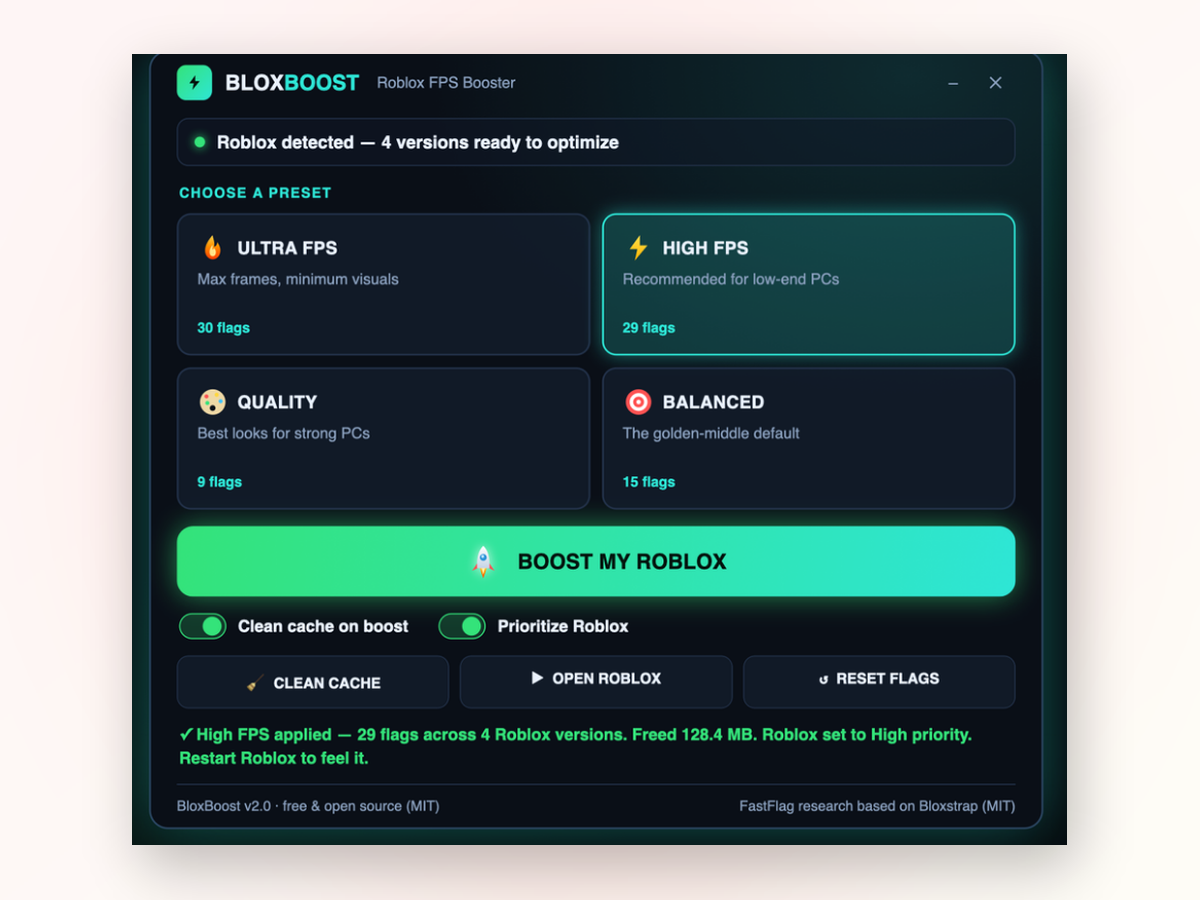
Roblox FPS Unlocker PC app window on Windows
Real-world results
Inside the appRoblox FPS Unlocker PC window

See the frame difference on your machine.

The boost hits hardest on budget laptops and older desktops where Roblox normally struggles to stay responsive. Every preset is tuned to find the sweet spot between smooth frames and visual quality.

Ultra presetStrips graphics down to essentials, unlocks the frame cap completely, and lets very old hardware breathe.
High presetCaps frames at 360 with Voxel lighting—recommended for most low-end PCs looking for the biggest gain.
Balanced presetKeeps the game looking recognizable at 144 FPS while ditching heavy shadows that drain weak GPUs.
Quick setup

Three steps from download to smoother gameplay.

The whole process takes under a minute.

  1. Download and unzipExtract the folder anywhere and open the app—no installer, no admin prompt, just launch it.
  2. Pick a preset and boostChoose from Ultra, High, Balanced, or Quality based on your hardware, then click the button. The app applies flags, clears cache, and bumps priority automatically.
  3. Launch RobloxClick Launch Roblox from the dashboard or open the game the normal way. Your preset is already active.
  4. Adjust or reset anytimeIf a preset feels too aggressive or too light, try another one. The Reset button reverts every change instantly so you can compare side by side.
Built different

Why use this instead of manually tweaking Roblox.

Manual optimization takes time and guesswork. This tool handles the whole process in one pass.

Tuned for weak machines

Built specifically for older laptops and budget desktops, not high-end gaming rigs. The presets are calibrated so you actually feel the difference. Every change is reversible if you want to experiment.

Cache matters on slow storage

Roblox accumulates logs and cached assets over time. Clearing that space sometimes reclaims enough performance to squeeze out extra frames. The tool reports how many megabytes it freed up.

Process priority keeps frames steady

Running Roblox at High CPU priority means the game gets consistent access to processor cores. On a crowded machine, that makes the difference between stuttery and playable.

Safe, transparent, reversible

The app writes to Roblox's own settings file—the same mechanism Bloxstrap and FastFlag packs use. Hit Reset and everything snaps back to vanilla. Full source code is readable so you know what runs.

Head to head

How it stands apart from tweaking tools and online boosters.

Most alternatives either make it complicated or don't actually work on weak hardware.

 Roblox FPS Unlocker PCManual registry tweaks
Time to set upOne click30+ minutes
Requires technical knowledgeNoYes
Can break Roblox updatesNoOften
Works offlineYesNo
Easy reset to defaultBuilt inManual revert
CostFree foreverFree
Your questions

Common questions answered.

Will this get my account banned?

No. The tool only writes to Roblox's local settings file using the same mechanism Bloxstrap relies on. Roblox allows this.

Does it work on Windows 11?

Yes. It runs on Windows 10 and Windows 11 both.

What if I don't like the results?

Press Reset and every change is undone instantly. You can then try a different preset or go back to vanilla Roblox.

Does it need admin rights?

No. The app opens and runs without elevation. Windows might show a SmartScreen notice since the build isn't code-signed, but you can dismiss it.

Will it slow down my computer outside of Roblox?

No. Close the app and it exits completely. There are no background services or tray processes.

What data does it collect?

None. The app is fully offline and does not phone home, track usage, or send telemetry of any kind.

Can I use this on multiple Roblox installations?

Yes. The app finds every Roblox version installed on your system and applies the preset to all of them in one pass.
Get smoother Roblox gameplay without upgrading hardware.

Download now and try a preset on your machine—if it's not the improvement you wanted, Reset takes you back instantly.

Download for Windows
Latest release · v2.1